

One interface for your next party
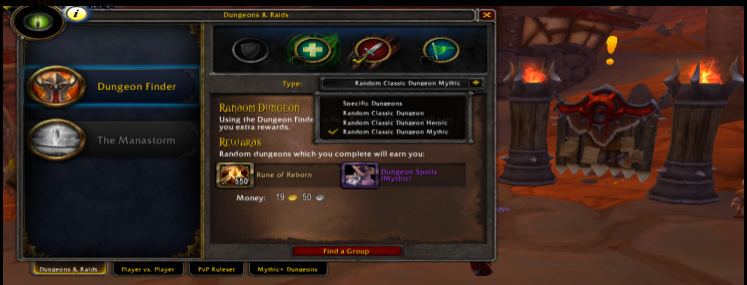
Open Dungeons & Raids and choose Dungeon Finder. The selected queue determines the available instances, entry conditions and reward preview. Check those details before you join.
Choose the role you can deliver
Role selection helps form a useful party. Select more than one only when your current setup can genuinely perform each of them.
Tank
Lead positioning, manage incoming pressure and keep enemies controlled.
Healer
Keep the party alive and plan recovery through longer encounters.
Damage
Deal reliable damage while helping with mechanics, control and interrupts.
From selection to the entrance
Select a specific dungeon or an available random queue, then choose the difficulty. Review the level and access conditions displayed by the game before pressing Find a Group.
When a group is offered, respond to the confirmation and prepare to enter. Queue availability and scaling follow the selected dungeon configuration; do not assume every mode has identical requirements.
Read the reward preview
A random queue may show a completion reward in addition to the dungeon loot. Inspect the reward tooltip and the selected mode so you know which objective must be completed.